A field hidden from the UI.
Two different functions still writing to it.
The studio's Contacts module had Lead_Source hidden — a disabled field, absent from the UI. Two separate functions were writing "Online Store" to it every time a Shopify order came in. Create_Shopify_Order_into_CRM_v2, line 94. Create_Shopify_Order_into_CRM (flow), line 64. Neither was visible in the Zoho admin console in a single view.
The audit used offline extracted metadata: module field schemas, CRM workflow and Blueprint definitions, scheduled function configurations, widget HTML and JavaScript, full Deluge function source, Zoho Flow connection status, Flow definitions, Flow function source, and the Creator portal form definitions. The client also provided a business process description.
The facts in these artifacts are, in principle, reachable through the Zoho admin GUI — a consultant with enough patience could click through every module, workflow, function, connector, and picklist and find what the analyzer finds. What the extraction provides is speed. Scattered facts become queryable data. Days of clicking become minutes of reading.
TechLedger's analyzer cross-references the extracted data automatically and produces a set of deterministic reports — a Field Analysis visualizer, an Alerts Report, and JSON/markdown exports. No AI is involved in generating these. The reports flag patterns that are worth a consultant's attention: disabled fields with active reads or writes, deprecated connectors, workflows whose trigger fields don't exist. They surface candidates; the consultant verifies them.
For this engagement, the analyzer output plus the process description were also read by an AI tool — Anthropic's Cowork, pointed at a local folder of artifacts — to accelerate the production of a client-ready audit narrative. I verified every AI-generated finding myself before the document was delivered. The analyzer produces facts; interpretation remains human work.
A working business with invisible drift
A custom-wig studio runs a mature Zoho stack — CRM, Flow, Creator portal — built up over years and integrated with Shopify, Acuity, RingCentral, WhatsApp, WorkDrive, and Shippo. Two people operate the whole thing: the owner and her office manager. Orders come in, wigs get made, clients get updates. On the surface the system worked.
Beneath the surface, things had drifted. The owner had a sense that automation wasn't doing what it used to. Quotes she thought were calculated by the system were being calculated by hand. Clients she thought were invited to the portal automatically were being invited one at a time. A widget button sometimes did nothing.
She commissioned a one-time system audit. The question wasn't "is anything broken?" — it was what, where, and how much of the operation had drifted away from what the system was supposed to do.
A disabled field, and two functions still writing to it
On the Contacts module, the Lead_Source field had been disabled — hidden from the UI, removed from the layout. A consultant opening any Contact record in the Zoho admin wouldn't see it, wouldn't know it existed, and would have no reason to check whether anything in the codebase was still touching it.
Two functions were writing to it. The Alerts Report made this findable by filename and line number in a single view:
CRM  · Disabled Field · Contacts.Lead_Source
     Function: Create_Shopify_Order_into_CRM_v2 [crm] (line 94)
     — create_customer.put("Lead_Source","Online Store");

CRM  · Disabled Field · Contacts.Lead_Source
     Flow Function: Create_Shopify_Order_into_CRM [flow] (line 64)
     — (same pattern)
Whether this is a bug depends on facts the analyzer can't determine on its own. The field may have been disabled deliberately but intentionally retained for back-end writes — a legitimate pattern for fields that exist purely as data for downstream systems. Or the disable may have been a mistake, in which case two customer-creation paths have been quietly failing to record a Lead Source on every Shopify order that landed in the system. Or one of the two functions may be dead code left from an earlier version of the integration, never cleaned up when the _v2 replacement shipped.
A Zoho-literate consultant can triage all three possibilities in under a minute. The point isn't that the analyzer pronounces a verdict — it's that the consultant gets to the question in under a minute instead of never getting to it at all. Two function names, two line numbers, one field. The whole forensic surface of the issue, in one row.
The pattern, across the whole module
The Alerts Report gave the headline finding at line-level precision. The Field Analysis visualizer gave the broader pattern: across every active module, which fields are disabled, which are referenced by code, and — importantly — which fields are flagged both ways at once.
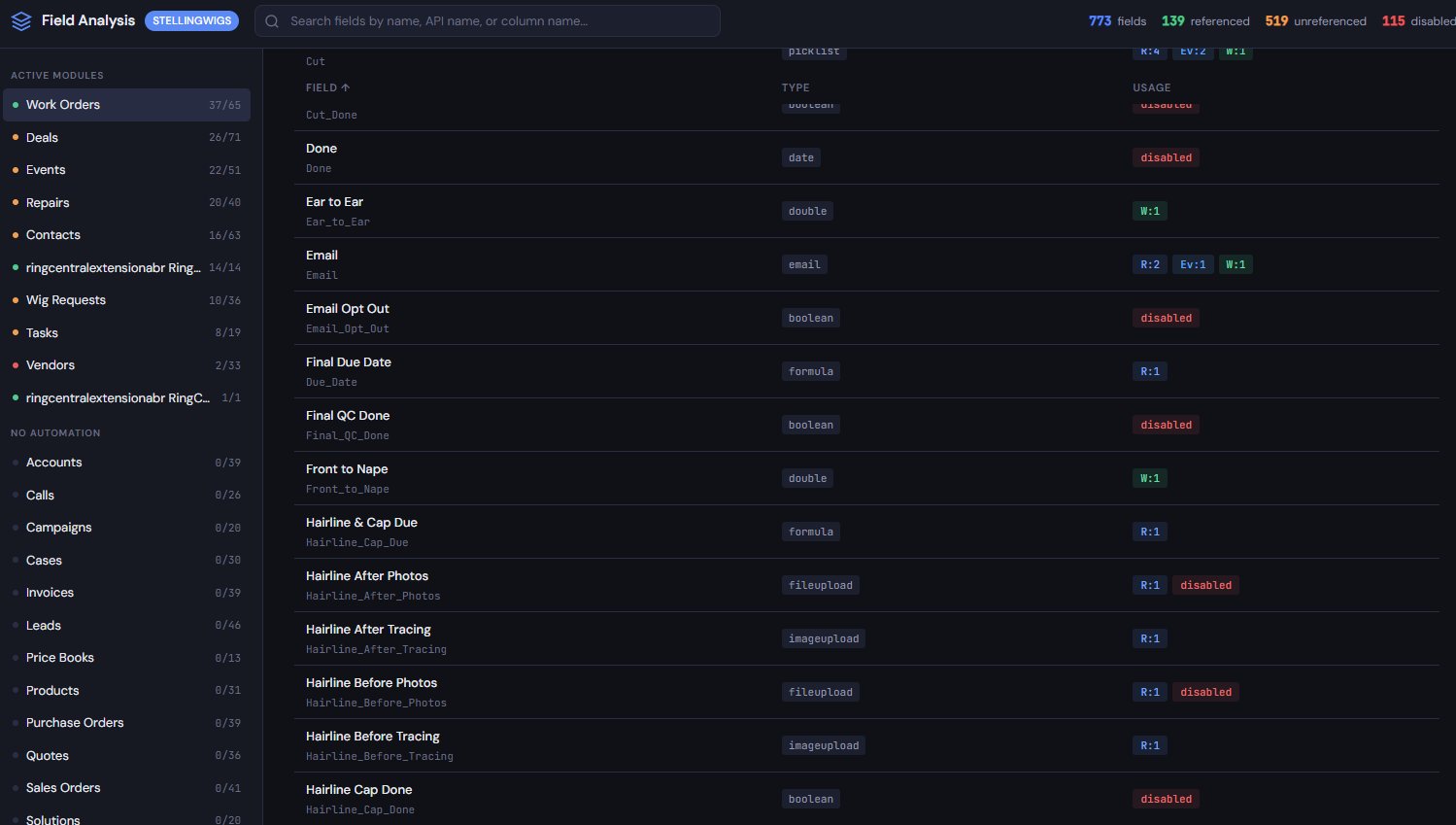
37/65 on Work Orders; 0/39 on Accounts and the other default modules nobody uses).
The main pane lists individual fields with usage badges: R: for reads in code,
W: for writes, Ev: for workflow evaluations. Pink disabled
badges mark fields the module setup has hidden from the UI.
The anomalies are the rows carrying both kinds of badge at once.
Three fields visible in the screenshot show both a read-count badge and a disabled badge — Hairline After Photos, Hairline Before Photos, and others scrolling below the fold. Each one is a field the module setup has hidden, which automation code is still reading from. Every one is worth a consultant's attention. None of them guarantee a bug.
This finding came from the visualizer alone. No AI needed. No process-map cross-reference. Just the fact that the analyzer arranged field metadata and automation-usage metadata in the same view, instead of in two separate admin screens nobody looks at together.
Flags with filenames attached
The Alerts Report extends the visualizer's pattern-surfacing with line-level citations. It scans the extracted corpus for specific alert conditions — disabled fields with reads or writes, deprecated connector types, widgets writing to picklist values that no longer exist — and produces a filterable list where every row points to a specific function, file, and line:
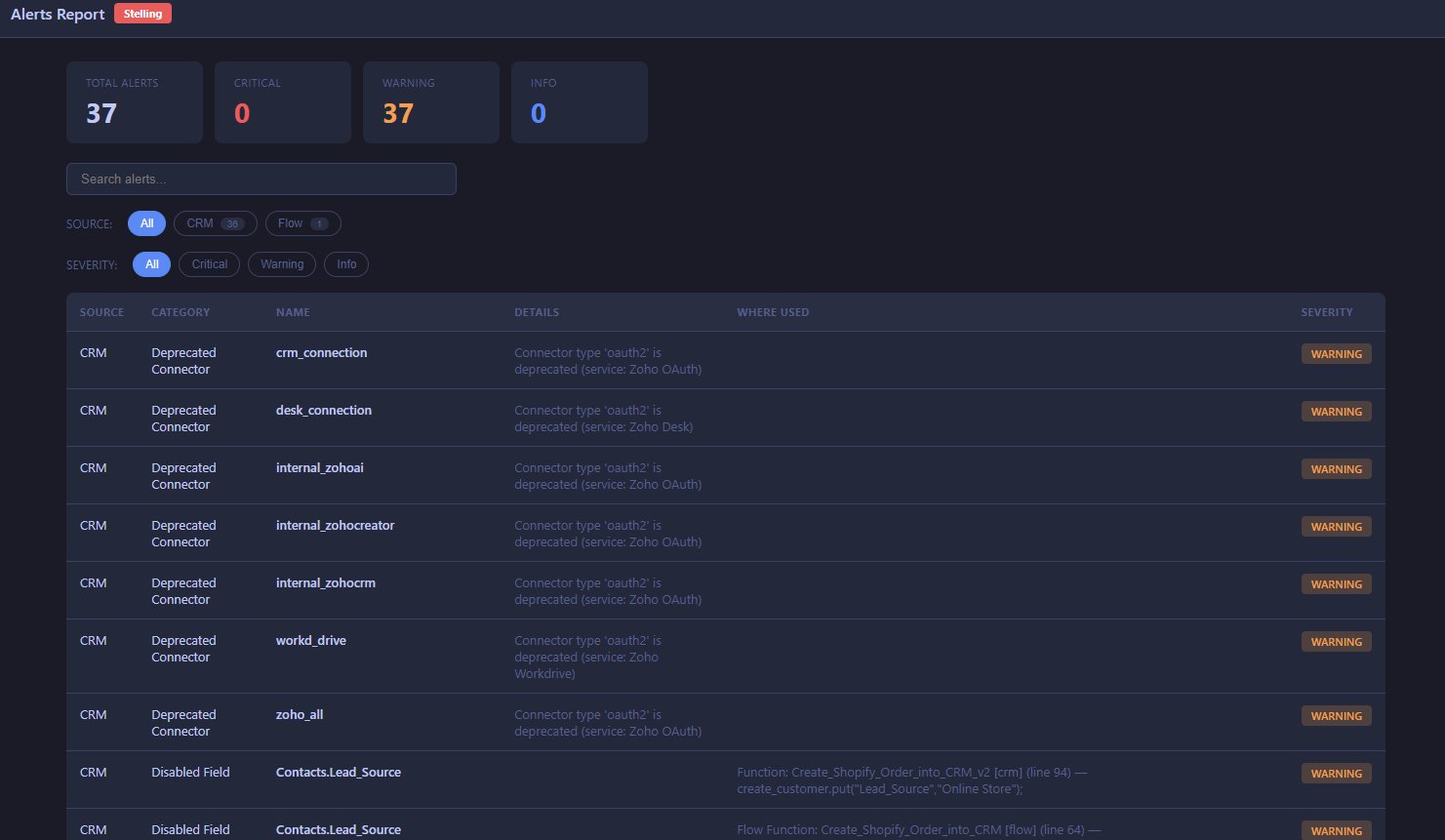
CRM, Flow) and
severity. The top seven rows flag OAuth2-deprecated connectors
(Zoho is sunsetting OAuth2 at the end of 2026). The bottom two rows are the
Disabled-Field writes discussed above, each with the function name and exact line number
where the write occurs. Every row in the report is a flag for consultant review, not a bug verdict.
The OAuth2 deprecations are a second illustration of the "surface, verify, triage" pattern. Zoho is deprecating OAuth2 connectors at the end of 2026. Every connector in the studio's environment flagged oauth2 will need to be migrated or replaced before that date — and the Alerts Report lists each one by name in a single view, instead of requiring the consultant to open each connection configuration screen individually. Seven deprecated connectors, seven rows, one report.
These aren't verdicts. A deprecated connector might be trivial to replace, or critical to revenue. A disabled field with writes might be intentional, or a silent bug. The report surfaces candidates; the consultant decides which matter and how.
More patterns the admin console doesn't assemble
Beyond the headline finding, cross-referencing the process map against CRM and Flow metadata turned up three more issues — each one a pattern that's trivially findable in structured extraction but requires assembling information from multiple admin screens in the Zoho GUI:
Request_Status = "New Request" on record creation. That picklist value had been removed from the live Wig_Requests module. Clicks on the widget silently failed with no error banner — the entry point to the vendor ordering workflow had been broken for an unknown period. Widget source on one side, picklist definition on the other; the Zoho admin shows each in a separate screen.
None of these showed up with warnings or alerts in the Zoho admin. Workflows toggle off without notification. Picklist values disappear without warnings to the widgets that depend on them. The admin console exposes drift — it doesn't surface it.
The system had more capability than its operators knew
Not every finding was a failure. Cross-referencing turned up something the owner hadn't expected to learn from an audit: her system had automation she didn't know existed.
The process map said "nobody advances stages in the system" — the studio's Work Phase tracking (hairline approved, bleaching approved, cut complete) was happening on paper because the CRM workflow for it was considered not yet built. But the extracted Flow function corpus contained two fully-written, phase-transition functions — Update_Work_Phase_From_Signoff and Update_Repairs_Work_Phase_From_Signoff — with complete logic for every phase. They just weren't wired to a UI. Building a "Hairline Approved" button that called the existing function would finish a feature the owner thought was months away.
Similarly, UpdateDeliveryStatusInCRM already handled Shopify-to-CRM stage mapping that the process map listed as a gap. Delivery tracking wasn't unbuilt — it was just unwired. Finishing it was a matter of connecting existing capability, not building from scratch.
This is a different category of forensic finding from "something is broken." It's "something was built, and then forgotten, and nobody knew to look for it." The extraction makes orphaned capability as visible as orphaned failure — and the two often sit a single function away from each other in the same extracted corpus.
Nineteen findings, one session
The complete audit documented 19 distinct issues — seven broken or blocking, seven improvements where the system and real operation had drifted apart, and five cleanup items. The numbers underneath show the cross-reference surface area a consultant would otherwise be walking by hand:
| 772 | Total CRM fields across all modules |
| 124 | Fields actually referenced by automation |
| 533 | Fields visible in the UI but unused by any logic |
| 115 | Fields disabled — including several the business needs |
| 26 | CRM workflows (20 active, 6 inactive) |
| 34 | Custom Deluge functions |
| 8 | Zoho Flows (6 active, 1 disabled, 1 draft) |
| 19 | Zoho Flow functions |
| 7 | Zoho Flow connections |
| 5 | Custom CRM widgets |
| 7 | Creator portal forms |
| 12+ | Unused default Zoho modules cluttering navigation |
A consultant reading the analyzer's visualizer and Alerts Report alone could identify the Disabled Field writes, the widget/picklist mismatch, the unused default modules, the OAuth2 deprecations, and the disabled-but-referenced fields — all without AI assistance. The orphaned Flow functions and the inactive workflows required pairing the extraction with the client's process description, which is where the AI pass accelerated the work. Every finding in the delivered audit document cited back to the specific extracted artifact that supported it — and I verified every AI-generated finding myself before delivery.
From starter-package audit to remediation contract
This was a new client. She commissioned a one-time audit of her system, and the bar she needed to clear was whether the output would justify the cost.
One related benefit surfaced during the remediation phase: the extracted metadata is equally useful for producing work, not just diagnosing it. Proposal documents, scope sheets, and change specifications for the remediation could be drafted with the extraction as the source of truth — module names, field API names, function names, and picklist values appear in every deliverable exactly as they exist in the live system. The AI drafting the document reads the extract rather than relying on its conversation memory. The result is that the documents going to the client have no spelling errors in the object names that actually matter.
Drift is findable — in reasonable time
Every long-lived Zoho system accumulates drift. Workflows toggle off and nobody notices. Picklist values get removed while widgets still depend on them. Connectors get marked deprecated by the platform. Fields get disabled but not fully cleaned out of code. Functions get written for features that later get dropped or forgotten.
All of this is, technically, findable through the Zoho admin GUI. A patient consultant could click through every module's field list, open every workflow to check its active state, read every function's source code, and open every connection to check its type. Given enough hours.
The analyzer compresses those hours into minutes. Not by doing anything the GUI couldn't do in principle — by making the same facts queryable as data, cross-referenced against each other, surfaced through deterministic reports. The consultant still reads, still decides, still verifies. What changes is how quickly they arrive at the decisions worth making.
The cross-referencing is the work. Extraction makes it fast enough to matter.